Every word in SpeakPad has one place, and it stays there. Your child learns where a word is and soon reaches for it without searching, the way you find a light switch at home without looking.
It grows without moving
You don't have to start with a full board. Choose a vocabulary stage and SpeakPad hides the words your child doesn't need yet, leaving gaps. Raise the stage and the gaps fill in. Nothing else moves.
In SpeakPad Starter, the three stages hold:
- First Words: about 125 words and phrases
- Growing: about 750
- Everything: about 2,500
School Vocabulary and Teen Social grow the same way.
Words of a kind sit together
The home board groups words by kind, and each kind has its own colour. Words like I and you fill the top row, with action words in the row below. Folders along the bottom lead to everything else.
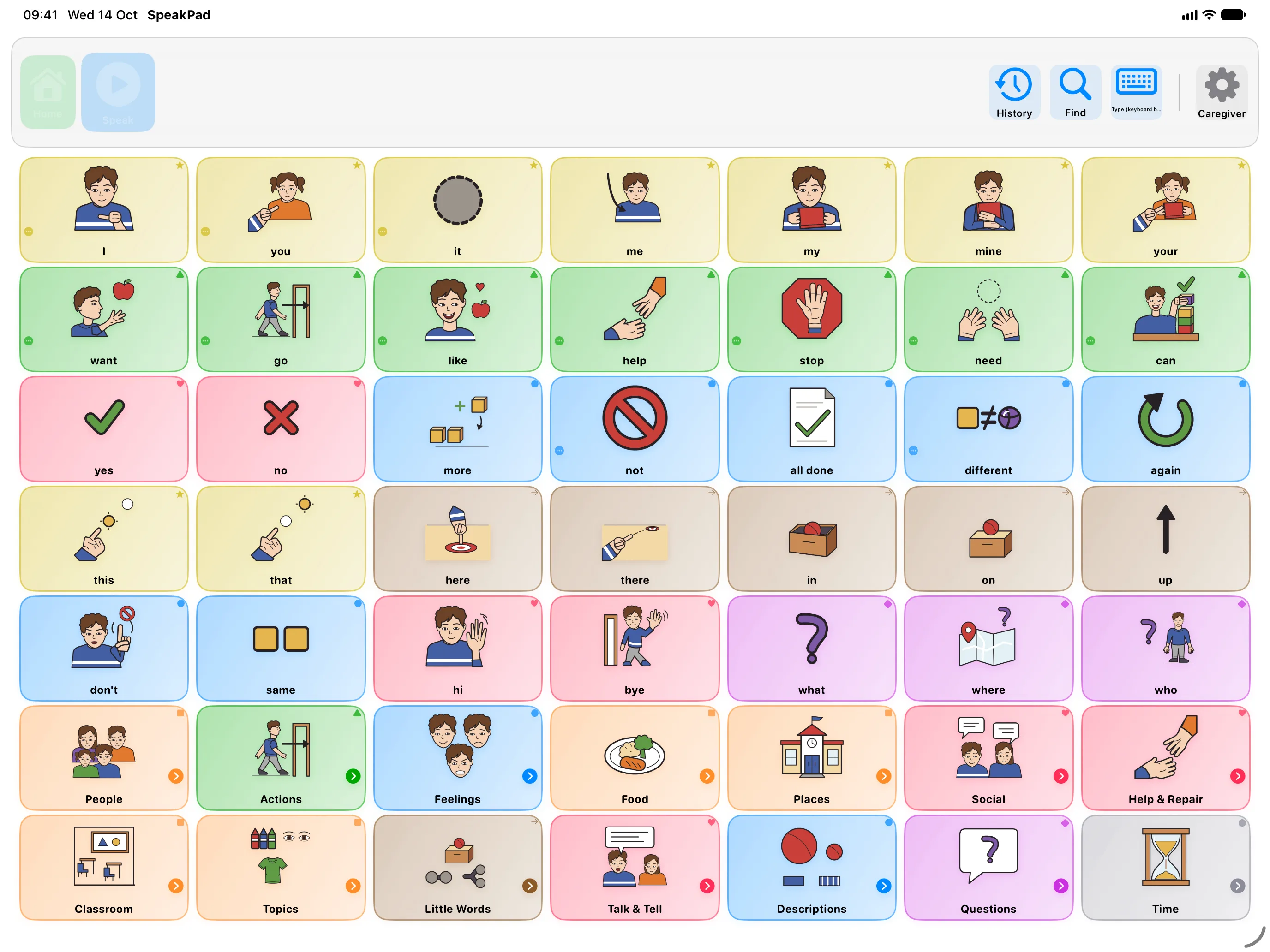
The home board holds the words young children use most, based on published research. By default its top three rows also stay at the top of every other board, so words like want, more and stop are always one tap away. Inside folders, the more common words come first.
Changing sets doesn't mean starting over
SpeakPad Starter, School Vocabulary and Teen Social keep core words in the same places, so your child can move to another set without learning the board again. School Vocabulary and Teen Social each change one folder on the first screen: School opens In Class, with words for lessons and the school day, and Teen opens My Life. Large Buttons is the exception. It has fewer, bigger buttons for children who can't yet see or reach a full board, so its words sit in different places.
The research behind it
In one study, young children found pictures faster by their fifth session when the pictures stayed in the same places than when they moved each session (Thistle and colleagues, 2018). In another, young children put words together faster when the pictures were grouped by kind of word (Thistle and Wilkinson, 2017). Both studies were with children without disabilities, so they're a guide rather than proof for every child. A review of research on AAC boards also suggests a child could start on a layout with gaps, then have them filled in once they know it well (Light and colleagues, 2019).
Ready to start?
The first week guide takes you from setup to your child's first sentence.
Your First Week with SpeakPadSources
- Thistle, J. J., Holmes, S. A., Horn, M. M., & Reum, A. M. (2018). Consistent symbol location affects motor learning in preschoolers without disabilities: implications for designing augmentative and alternative communication displays. American Journal of Speech-Language Pathology, 27(3), 1010-1017.
- Thistle, J. J., & Wilkinson, K. M. (2017). Effects of background color and symbol arrangement cues on construction of multi-symbol messages by young children without disabilities: implications for aided AAC design. Augmentative and Alternative Communication, 33(3), 160-169.
- Light, J., Wilkinson, K. M., Thiessen, A., Beukelman, D. R., & Fager, S. K. (2019). Designing effective AAC displays for individuals with developmental or acquired disabilities: state of the science and future research directions. Augmentative and Alternative Communication, 35(1), 42-55.
- Banajee, M., Dicarlo, C., & Buras Stricklin, S. (2003). Core vocabulary determination for toddlers. Augmentative and Alternative Communication, 19(2), 67-73.
- Beukelman, D. R., Jones, R. S., & Rowan, M. (1989). Frequency of word usage by nondisabled peers in integrated preschool classrooms. Augmentative and Alternative Communication, 5(4), 243-248.