Collecting AAC data by hand, with tally sheets balanced on a clipboard, is nobody's favourite part of therapy. SpeakPad records word use automatically as the child communicates, and turns it into charts and reports you can actually hand to someone.
What Gets Recorded
SpeakPad logs word taps and spoken messages for each profile. The data is stored on the device and never sent to us: it powers the analytics screens, message history, and word prediction. It leaves the device only in an export you make, or in your own iCloud backup unless you turn off Include Usage Data in Data & Backup. Recording can be switched off entirely, and logs can be cleared at any time, so you stay in charge of what is kept.
Viewing the Analytics
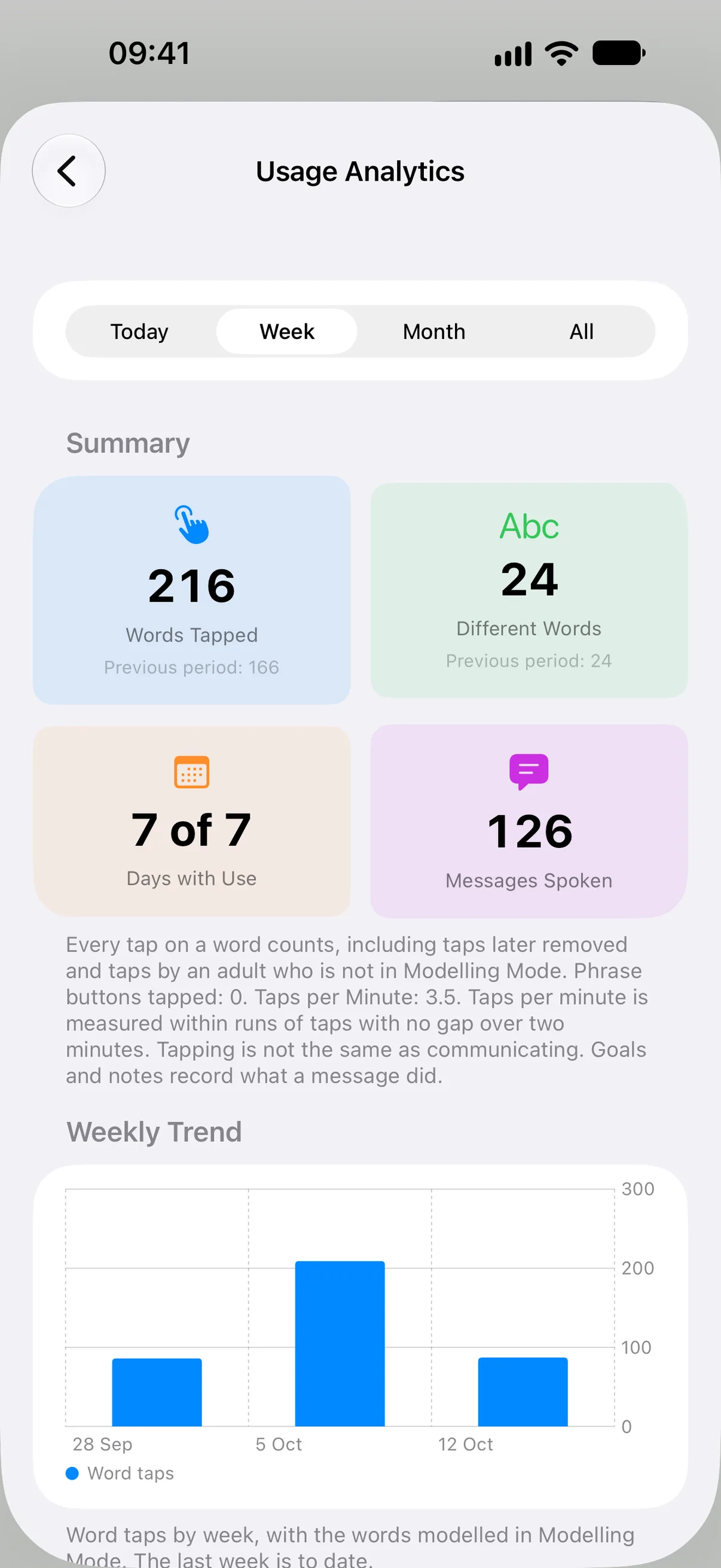
In Caregiver Mode, tap Settings, then under Caregiver tap Usage Analytics. Choose Today, Week, Month or All. The summary shows Words Tapped, Different Words and Days with Use, each beside the previous period, then Messages Spoken and Taps per Minute. Below it come the weekly trend, the most used words, daily activity, word categories by colour group, how much of the home board, word type by word type, and of the other boards the child has used, and the message history. A therapist can spot in seconds what a month of tally sheets used to show: which words have taken off, and which modelled words have not landed yet.
This Week and Target Words
For a quicker look, open More → This Week in the caregiver editor. It sums up the last seven days of your child's own taps: days with use, words tapped and different words, two-word messages and new words, with the words you modelled on a separate line and a weekly trend once there are two weeks of use. Add one or two Target Words there to see how often each was tapped, and Modelling Mode will focus on one of them each day. Turn on Sunday Reminder for a short summary of the week every Sunday evening; it is made on the device and stays off until you turn it on.
Exporting Data
From the analytics screen, scroll to Export Data and choose a format: Export as CSV or Export as JSON for spreadsheets and analysis tools, Export Messages as CSV for the spoken messages on their own, Plain Text Report for quick notes, or PDF Report for SLT. The dashboard and raw CSV/JSON exports are free. Formatted activity PDF reports require Pro. Printing a communication board stays free.
Goals and Data Sessions with Pro
In SpeakPad 3.0.1 or later, open Settings → Usage Analytics in Caregiver Mode and find Goals. With Pro, use Add Goal to set a communication goal, then Start Data Session to measure its use. Review the session to mark prompted uses and see progress over time. Pro also provides printable data sheets and goal progress in PDF reports. Viewing existing goals and raw data exports stay free, as do ordinary target-word counts and dated session notes. To combine a colleague’s recorded goal sessions, use Import Team Goals with their backup of the same communicator. This merges goal records without replacing your boards.
The SLT Report
The PDF is titled Usage Report and is laid out to be read across a table at a school review or therapy meeting: a summary with the previous period, language measures, target words, the weekly trend, most used words, word categories, vocabulary coverage, each goal with its sessions in a table, and dated notes when Include Notes in PDF Report is on. The child's actual message text stays out unless you turn on Include Recent Message Text in PDF, because what a child says can be sensitive. Every report ends with About These Numbers, which says what each figure counts. Generate it just before the session and the conversation starts from real data rather than recollection.
See a Sample Report
A one-month Usage Report for Ada, a made-up communicator with ten weeks of use, caregiver modelling, phrase buttons, three goals and five reviewed sessions, with recent message text turned on. It is in English; the app prints the report in the language of the caregiver menus.
Download the sample report (PDF)What the Numbers Mean
A report is only useful if the people reading it trust what it counts. These are the rules SpeakPad follows, and they are printed at the end of every PDF so a parent or teacher who did not run the sessions can read it without the app in hand.
- Word taps count every word added to the message bar, including ones removed again. An adult's taps count too unless Modelling Mode is on, so turn it on when you tap for the child.
- Modelled taps, made in Modelling Mode while an adult shows words, are listed on their own line and never counted as the child's.
- Messages are what the Speak button said, one word or many. A phrase button speaks a ready-made message with one tap and is counted on its own line, so it does not inflate word counts or message length.
- Runs of use are stretches of taps with no gap over two minutes, a rough count of how often the device was picked up. Taps per minute is measured inside them.
- Coverage is the share of words on the boards that the child used at least once in the period. The home board, which holds the core words, is shown with its word types, and the other boards are counted apart from it, so adding a board never lowers the home board figure.
- Goals are measured in data sessions that staff review afterwards, marking the support each use needed. A use nobody reviewed counts toward nothing, and a session with unreviewed uses does not count toward the criterion.
- None of these numbers measures understanding or what a message meant. Goals and notes carry that.
Sharing Boards, Not Just Data
Collaboration runs the other way too: any single board can be shared by AirDrop, so a therapist can build a board in a session and send it to the family iPad before they leave the room. When they send a revised version later, opening a board with the same name asks whether to Update Existing or Add as New, so the family's copy can be updated in place. For families using a different AAC app elsewhere, SpeakPad imports boards in the standard Open Board format (.obf and .obz), and SpeakPad Pro exports them as .obz.
One iPad, Several Children?
Analytics are tracked per profile, so each child on a shared therapy iPad gets their own data and their own reports.
Profiles Guide